
Welcome to the Baby Audio installation page.
Please take a look at our installation guide videos below, which provide information on how to register, install and authorise your Baby Audio software.
System Requirements
Mac
- 10.13 or above.
- macOS 13 Ventura supported.
- 64-bit required.
- Native Apple M1 processor support, including Apple M1 Ultra.
- 3.4 GHz Quad-Core or M1 CPU with 8GB of RAM recommended.
- Available in AU, VST, VST3, AAX & Standalone formats
Windows
- Windows 7 or above (including Windows 11), 64-bit required.
- Quad-core computer with 8GB of RAM recommended.
- Available in VST, VST3, AAX & Standalone formats
Mac Video Installation Guide
Windows Video Installation Guide
Alternatively, you can follow the step-by-step instructions below for your software.
Mac
Registration
Note: Voltage Modular Core 2 + Electro Drums have been used as an example.
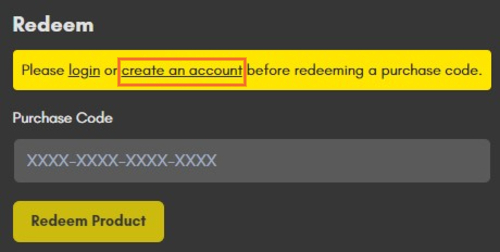
1. Visit https://store.cherryaudio.com/redeem?ref=PluginBoutique > click ‘create an account’ to register your product. (If you already have a Cherry Audio account, simply click ‘login’).
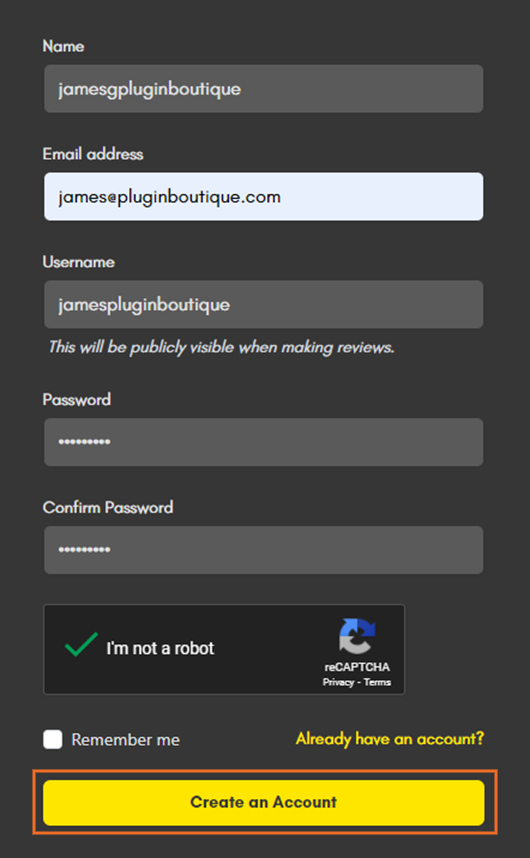
2. Enter your details and click the 'I'm not a robot’ reCAPTCHA > click 'Create an Account'.
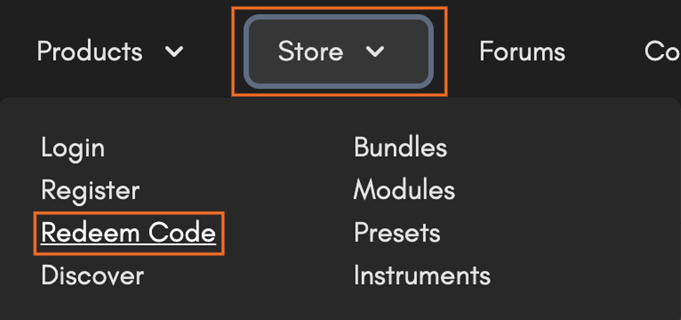
3. Once logged in click ‘Store’ on the top toolbar and then ‘Redeem Code’.
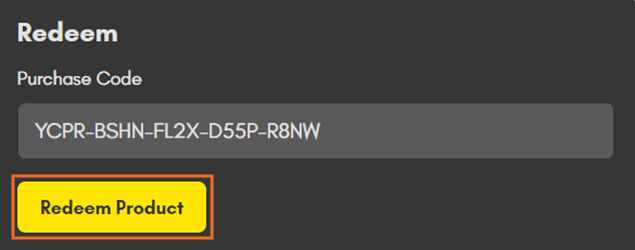
4. Enter the serial number from your Plugin Boutique account > click 'Redeem Product'.
Installation
1. Choose the correct Mac format for your systen (Intel or M1) > click 'Download'.

2. Open the downloaded .pkg installer > Click 'Continue'.

3. Read through the Software License Agreements > Click 'Continue'.

4. Click 'Agree'.

5. Select your installation destination > Click 'Continue'.

6. Choose the plugin formats you want to install > click 'Continue'.

6. Click 'Install'.

7. Click 'Close' to complete the installation process.

Activation
1. Open your installed product and enter your Cherry Audio registered Email and Password > Click 'Login'.
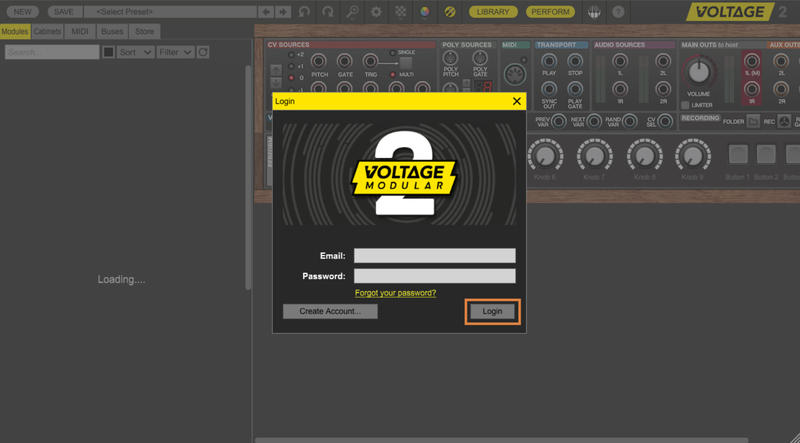
Your software is now activated and ready to use!

Windows
Registration
Note: Voltage Modular Core 2 + Electro Drums have been used as the example.
1. Visit https://store.cherryaudio.com/redeem?ref=PluginBoutique > click ‘create an account’ to register your product. (If you already have a Cherry Audio account, simply click ‘login’).
2. Enter your details and click the 'I'm not a robot’ reCAPTCHA > click 'Create an Account'.
3. Once logged in click ‘Store’ on the top toolbar and then ‘Redeem Code’.
4. Enter the serial number from your Plugin Boutique account > click 'Redeem Product'.
Installation
1. Choose the Windows format > click 'Download'.

2. Open the downloaded .exe installer > Click 'Next'.

3. Select 'I Agree to the Terms of this License Agreement' > Click 'Next'.

4. Choose the plugin formats you want to install > click 'Next'.

5. Click 'Next'.

6. Click 'Finish' to complete the installation process.

Activation
1. Open your installed product and enter your Cherry Audio registered Email and Password > Click 'Login'.
Your software is now activated and ready to use!
If you would like any further assistance with your software, please feel free to reach out to our support team at support@pluginboutique.com.